> ## Documentation Index
> Fetch the complete documentation index at: https://docs.hivenet.com/llms.txt
> Use this file to discover all available pages before exploring further.
# How can I delete my Compute account?
> Permanently remove your Compute profile and all associated data.
## Why think twice?
* All running **and** stopped instances will be terminated.
* Every disk, snapshot, and backup tied to Compute will be wiped.
* Any remaining credits vanish when the account does.
* You’ll be logged out the moment deletion completes.
This action is immediate and cannot be undone.
If you just need a breather, you can [pause or shut down instances instead](/documentation/essentials/stop-terminate-instance). Feel free to [contact Support](mailto:support@hivenet.com) to explore alternatives.
## What you’ll need
* Access to the Hivenet account you want to delete.
* Any data you care about **already downloaded** to a safe place.
* A quick check that you’ve used (or are willing to lose) any Compute credits.
## Steps to delete your Compute account
1. Sign in to Compute and select **Account → Settings**.
2. Scroll down to **Delete account**.
3. Click **Request to delete account**.
4. In the confirmation window, tick every box to confirm you understand the impact.
5. Select **Delete account**.
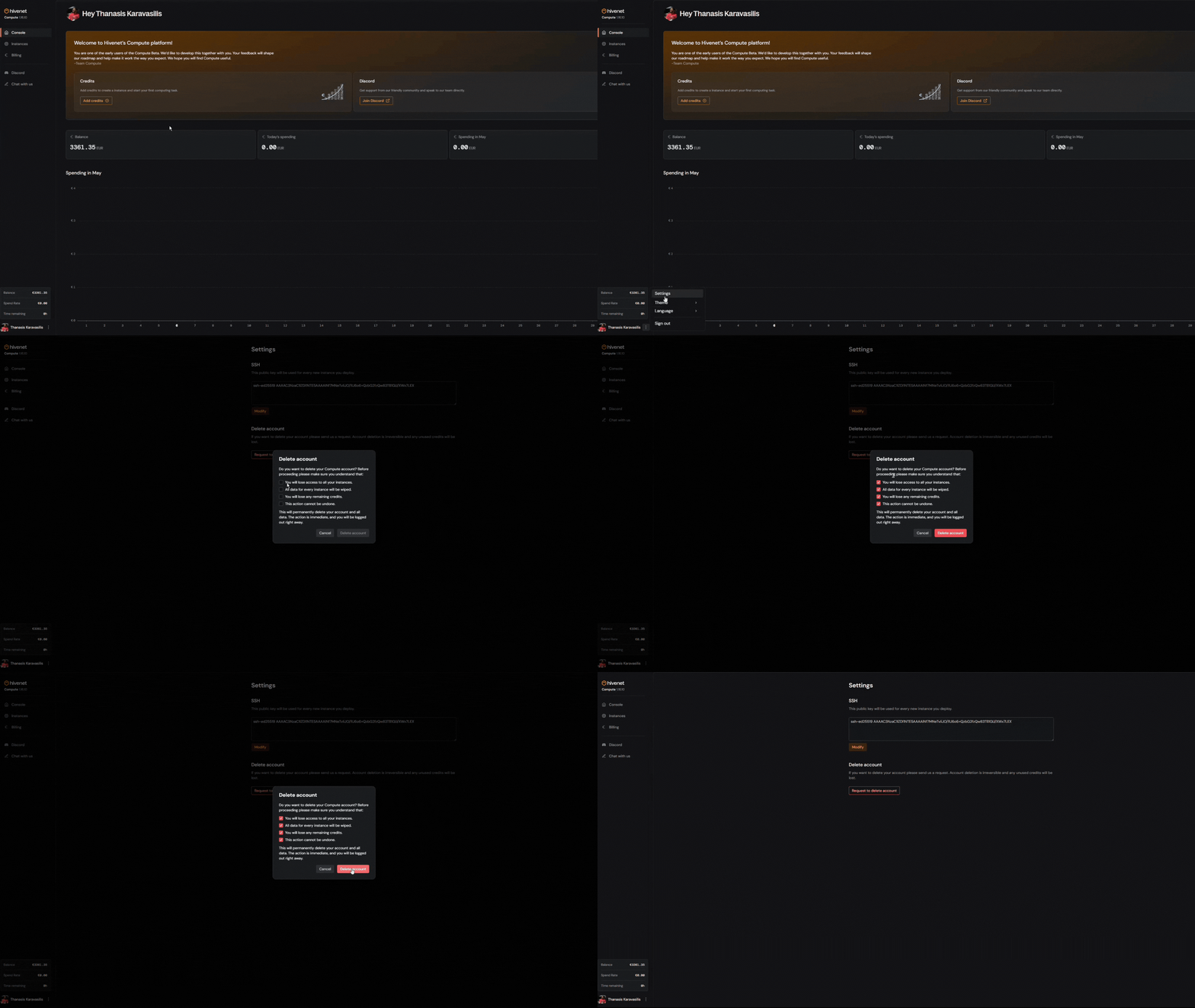 That’s it. Your Compute account and data are gone for good. We’ll log you out right away and send a confirmation email.
## What happens next?
* Your Compute resources are scrubbed from our network within minutes.
* Any pending deployment or billing processes tied to Compute are canceled.
* Your Hivenet **Store** files and other services stay untouched. (Want to delete those too? [Here is how](https://help.hivenet.com/en/articles/164662-how-can-i-delete-my-hivenet-account).)
* You can reopen Compute any time by signing in and creating a new workspace—just note that previous data and credits are not recoverable.
For now, your Compute account is separate from your main Hivenet account. Deleting Compute won’t affect your access to cloud storage, file transfer, or other services unless requested separately.
## Need another option?
If high costs or unused capacity are the issue, consider:
* Stopping or deleting individual instances instead of the whole account.
* Downgrading instance sizes.
Our Support team is always happy to talk through the best path forward.
***
Still have questions? Join us on [Discord](https://discord.gg/cTmPDPrMG2) or chat with the team.
That’s it. Your Compute account and data are gone for good. We’ll log you out right away and send a confirmation email.
## What happens next?
* Your Compute resources are scrubbed from our network within minutes.
* Any pending deployment or billing processes tied to Compute are canceled.
* Your Hivenet **Store** files and other services stay untouched. (Want to delete those too? [Here is how](https://help.hivenet.com/en/articles/164662-how-can-i-delete-my-hivenet-account).)
* You can reopen Compute any time by signing in and creating a new workspace—just note that previous data and credits are not recoverable.
For now, your Compute account is separate from your main Hivenet account. Deleting Compute won’t affect your access to cloud storage, file transfer, or other services unless requested separately.
## Need another option?
If high costs or unused capacity are the issue, consider:
* Stopping or deleting individual instances instead of the whole account.
* Downgrading instance sizes.
Our Support team is always happy to talk through the best path forward.
***
Still have questions? Join us on [Discord](https://discord.gg/cTmPDPrMG2) or chat with the team.